
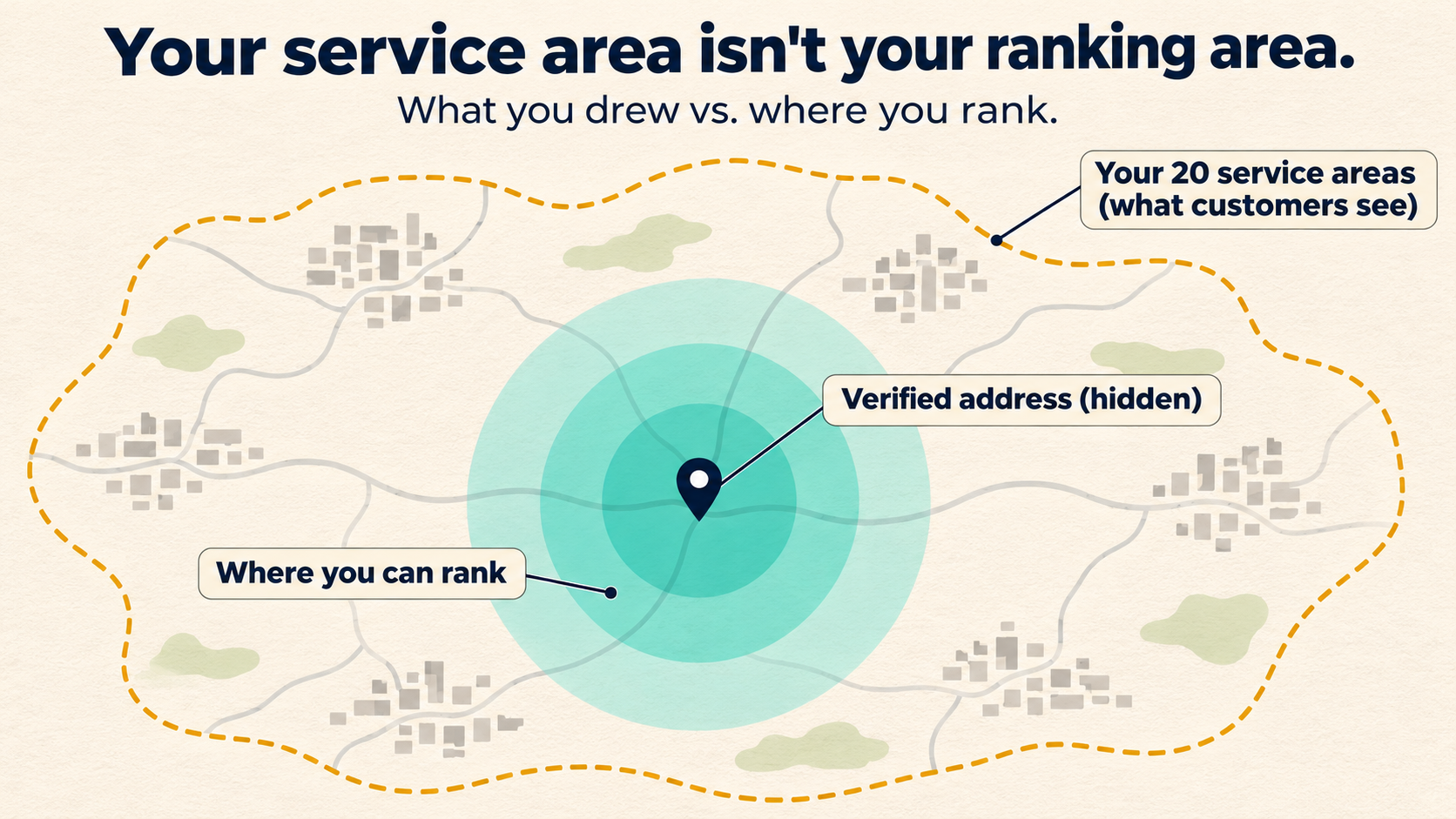
If your plumbing company isn't showing up on Google Maps, it's almost always one of four things — an unverified or suspended profile, the wrong primary category (the #1 ranking factor in Whitespark's 2026 survey of 47 local SEO experts), a business that's simply too far from the searcher, or thin reviews. The surprise: the towns you type into your "service area" don't decide where you rank. Google lets you list up to 20 of them, but in Sterling Sky's testing, rankings stayed tied to the address you verified with — even when that address is hidden. The service area mostly just draws an outline on the map.
The setting plumbers trust too much
Sit down with almost any plumber who's frustrated with Google Maps and pull up their Business Profile, and you'll usually land on the same screen: the service area. It's the box that feels like it should be the answer. You type in the towns you want work from, Google shades them in on the map, and it sure looks like you just told Google where to send you customers. It's no wonder so many owners spend a Saturday carefully adding every town and ZIP code in the county.
The clearest look at what that box really does comes from Sterling Sky, the local SEO agency run by Joy Hawkins (she also runs the Local Search Forum, where a lot of the people who study Google Maps for a living compare notes). They tested it on their own listing. Their real address is in Uxbridge, Ontario. They listed Toronto as a service area.
Then they tracked where they ranked. They didn't rank in Toronto. Their conclusion was blunt: for a service-area business, ranking is tied to the verified address, and the service area's effect is visual — it draws the shaded outline on the map, and that's about it.
Now picture a plumber whose shop is really his garage in a small town 20 minutes outside the city. He verified his Google profile at that house years ago, hid the address like Google tells him to, and listed the city plus 19 suburbs as his service area.
He can't figure out why a homeowner across town never sees him in the map results, while three competitors with offices closer to the city center always do. He's done everything "right." He just doesn't know that Google is measuring distance from a pin he forgot he planted.
That's the gap almost every "why isn't my plumbing business on Google Maps" article skips. They give you the same 9-point checklist — verify, add photos, get reviews — and never explain the one thing that actually decides where on the map you can win. So let's fix that, and then work through the rest of the checklist honestly.
First: are you missing, or just ranking low?
"Not showing up" can mean three very different problems, and each one has a different fix. Spend three minutes figuring out which one you've got before you change a single setting.
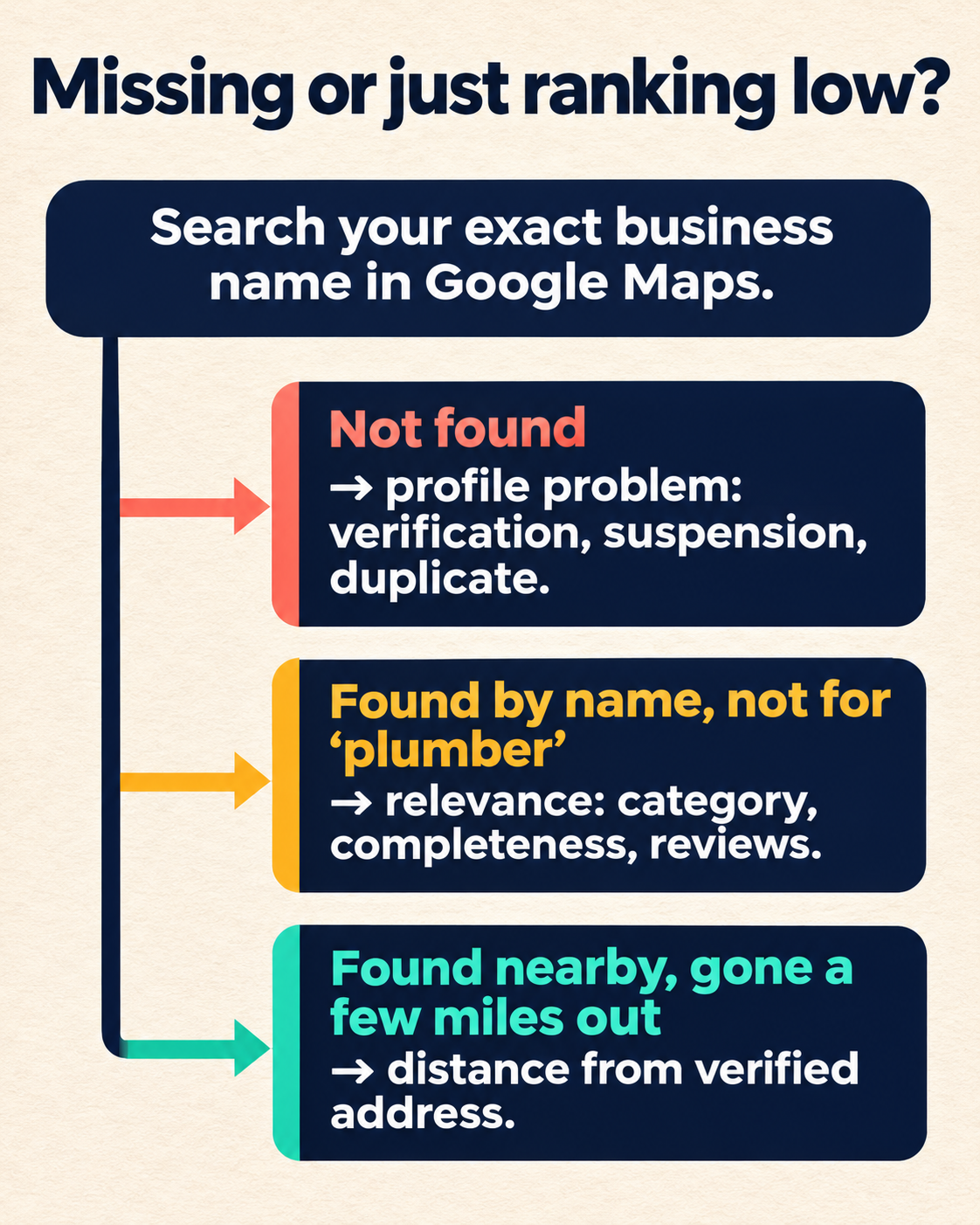
You don't show up even when someone searches your exact business name. Open a private (incognito) window, go to Google Maps, and search your real business name plus your town. If you're nowhere, this is a profile problem: unfinished verification, a suspension, or a duplicate listing. Log into your Business Profile and look for a status warning before you do anything else.
You show up for your name, but not for "plumber" or "plumber near me." Your profile exists; Google just doesn't think you're the best match. That's a relevance and prominence problem — categories, completeness, reviews. Keep reading.
You rank fine near your shop, then disappear a few miles out. That's distance — and usually the verified-address issue from the story above.
A testing tip most guides leave out: you can't check this from your own phone at your own shop. Google says distance is how far each business is from the person searching, so your results are rigged in your favor wherever you're standing. Ask a customer or a friend in the town you care about to search "plumber" and text you a screenshot. Paid "geo-grid" rank trackers do the same thing across a map of points; they're handy, but a few screenshots from real people will tell a small shop most of what it needs to know.
Be patient after you make changes. Google says rankings for a new business can take up to a month to appear, and edits can take up to three days to affect results. Service-area edits can take up to 48 hours just to show on the profile. Change one thing, wait, check again — don't change five things on a Tuesday and panic on Wednesday.
Is your Google Business Profile complete?
Google doesn't hide this one. Its own help page on local ranking says businesses with complete and accurate info are more likely to show up in local results. But "complete" doesn't mean "stuffed." Here's what actually matters for a plumber, in rough order of how often I see it go wrong.
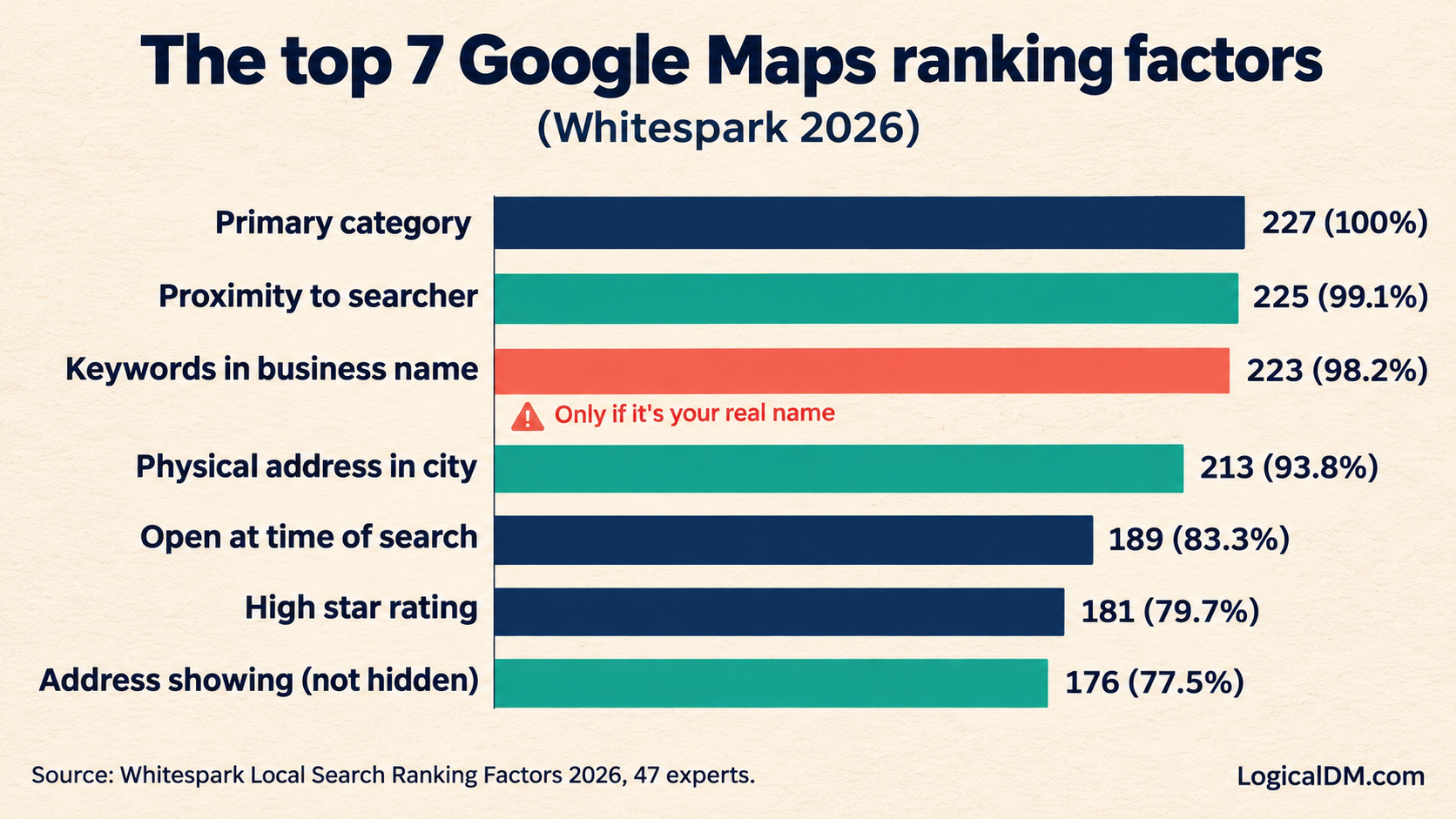
Your business name is your real name — nothing extra. This is the one that hurts, because it works right up until it doesn't. In Whitespark's 2026 Local Search Ranking Factors report, "keywords in the business title" scored as the #3 factor for the map pack. So it's tempting to rename yourself "Smith Plumbing – 24/7 Emergency Plumber Springfield." Don't. Google's guidelines say adding unnecessary information to your business name isn't permitted and can get your profile suspended, and keyword-stuffed names are the suspension trigger local SEO folks cite most. If "Plumbing" or your town is genuinely part of your registered name and your truck lettering, great. If it isn't, you're borrowing against your whole listing.
Your hours tell the truth. "Business is open at time of search" ranked #5 in the same Whitespark survey. For plumbers that's a big deal: a homeowner searching at 11 p.m. with water on the floor is more likely to see the shops marked open. If you really answer the phone around the clock, say so. If you don't, don't — the reviews from people who called a "24-hour" plumber and got voicemail will cost you more than the hours ever earned you.
Your services are filled in. List the actual jobs you do: drain cleaning, water heater repair and replacement, sewer line work, leak detection, repiping. Sterling Sky ran a test where adding a single service to a profile produced a measurable ranking change within 24 to 72 hours. One test isn't gospel, but it's a free field that takes ten minutes.
Reviews — enough of them, and recent. BrightLocal's 2026 Local Consumer Review Survey (1,002 U.S. consumers) found that 47% won't use a business with fewer than 20 reviews, 74% want to see reviews from the last three months, and 31% now require 4.5 stars or higher — up from 17% a year earlier. That middle number is the one plumbers miss. A shop with 140 reviews and nothing new since last spring looks, to a customer, like a shop that might have closed.
The boring stuff. A local phone number that a human answers, your real website linked, a short description written like you'd explain yourself to a neighbor, and real photos of your trucks, your crew and your work. None of these are magic. All of them are part of "complete."
Are your service areas and categories accurate?
This is the section that does the real work, so let's slow down.
Your primary category is the single biggest lever
Whitespark's 2026 survey scored 187 factors. "Primary GBP Category" came in first, with a score of 227. For nearly every plumbing company, the primary category should be Plumber — that's the category that matches the searches homeowners actually type. Then add secondary categories (they ranked #8) only for work you genuinely do and want calls for, like drain or water-heater work.
Start typing in the category box and see what Google offers in your market. Don't add "General contractor" or "Bathroom remodeler" to cast a wider net unless you really sell that work; a category that doesn't match what you do is a relevance signal pointing the wrong way.
The service area fact nobody puts in bold
Here's what Google's own help pages say about service areas:
You can list up to 20 service areas.
You enter cities, ZIP codes or other named areas — there's no radius setting anymore.
Your overall area shouldn't extend more than about 2 hours of driving time from where your business is based.
Since a June 24, 2025 guideline change, states and countries aren't allowed as service areas.
And here's what Google doesn't say anywhere: that listing a town helps you rank in that town. Look at the top of Whitespark's 2026 list and you'll see why. Factor #2 is proximity of the address to the person searching (score 225). Factor #4 is having a physical address in the city being searched (213). Factor #7 is having your address showing, as opposed to being a hidden service-area business (176). Three of the top seven factors are about where your pin is. None of them are about the towns you typed in.
That's why Sterling Sky's Toronto test came out the way it did, and it matches what practitioners report on the Local Search Forum: Google counts distance for a service-area business from its hidden address.
In fairness: this isn't unanimous. Darren Shaw, who founded Whitespark and runs that survey, has argued that service areas do have some impact. My read of the evidence is that if there's an effect, it's small next to distance. Either way, the practical advice is the same: set your service area honestly for your customers, and stop expecting it to do your ranking for you.
So what do you actually do with this?
Find out what address you verified with. In your profile, check the business location, even if it's hidden. That's your ranking center. If it's an old address, you have a problem.
If you've moved, deal with it properly. Whitespark has documented a bug where a hidden-address business that moves keeps ranking around its old location. Update the address in your profile and expect to re-verify; don't open a second listing.
If you genuinely have a staffed shop, consider showing it. Google lets "hybrid" businesses show a storefront address and a service area. Sterling Sky watched a home-services client's rankings drop sharply when its address was hidden and recover when it was shown again. But that only applies if customers can really visit you during your listed hours. Google's guidelines specifically say a plumber who runs the business from a home address should clear that address from the profile.
Set the service area for humans. List the towns where you'll truly take a job, staying inside that 2-hour guideline. It helps customers understand where you work. That's its job.
What can you do if nearby competitors appear above you?
First, a gut check. BrightLocal's 2026 consumer research found that 72% of people look at three or fewer businesses before choosing one. You don't need to be #1 everywhere. You need to be in the top three in the places you can actually win.
Step 1: Figure out why they're above you
Pick the three plumbers who beat you in the area you care about, and write down five things for each one (and for yourself):
Check |
What to look at |
|---|---|
Distance |
Where is their pin compared to the searcher, and compared to yours? |
Primary category |
Click their profile — the category shows under the name. |
Name |
Is it their real name, or a name with keywords bolted on? |
Reviews |
Total count, star rating, and the date of their newest review. |
Hours |
Are they showing "Open" when you're showing "Closed"? |
Nine times out of ten, the answer is sitting in that table. If they're two miles closer to the searcher, that's the reason, and no amount of photo uploading will fix it. If they're the same distance away with 60 fresh reviews to your 12 old ones, now you know what to work on.
Step 2: Work the things you control
Reviews, on a rhythm. Ask every happy customer, every week, not in a burst once a year. Recency is what customers look at, and it's one of the factors that grew in importance in Whitespark's 2026 report.
Hours and services, as covered above.
Your website. For the regular (non-map) local results, Whitespark's experts put on-page signals at 33% of ranking influence — the biggest single group. A genuinely useful page for each town or service you care about (real jobs, real photos, real details — not the same paragraph with the city name swapped) helps you show up in the organic results below the map, even in towns where you can't win the map itself. Sterling Sky has reported real conversions coming from well-built service area pages.
Step 3: Report the cheaters (carefully)
If a competitor above you is clearly breaking the rules — a keyword-stuffed name, a fake address at a mailbox store, three listings for one company — you can use "Suggest an edit" on their Maps listing or Google's business redressal complaint form. Stick to facts you can show. Don't do it to anyone who's simply beating you fair and square.
Step 4: Know that there's a lane above the map
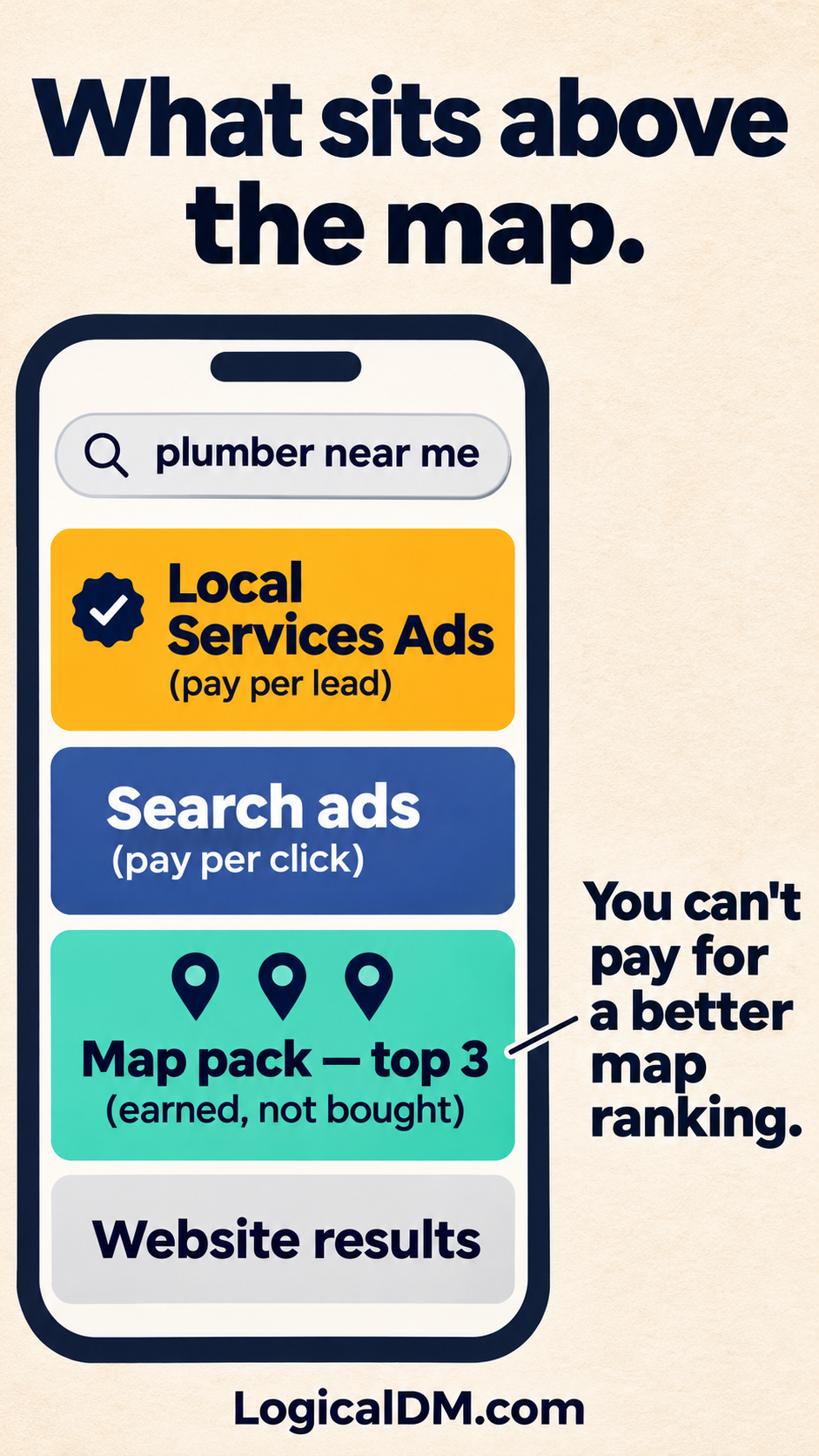
Google says plainly: there's no way to request or pay for a better local ranking on Google. But Local Services Ads are a separate, paid product that sits above the regular ads and above the map pack, with the "Google Verified" badge (formerly Google Guaranteed).
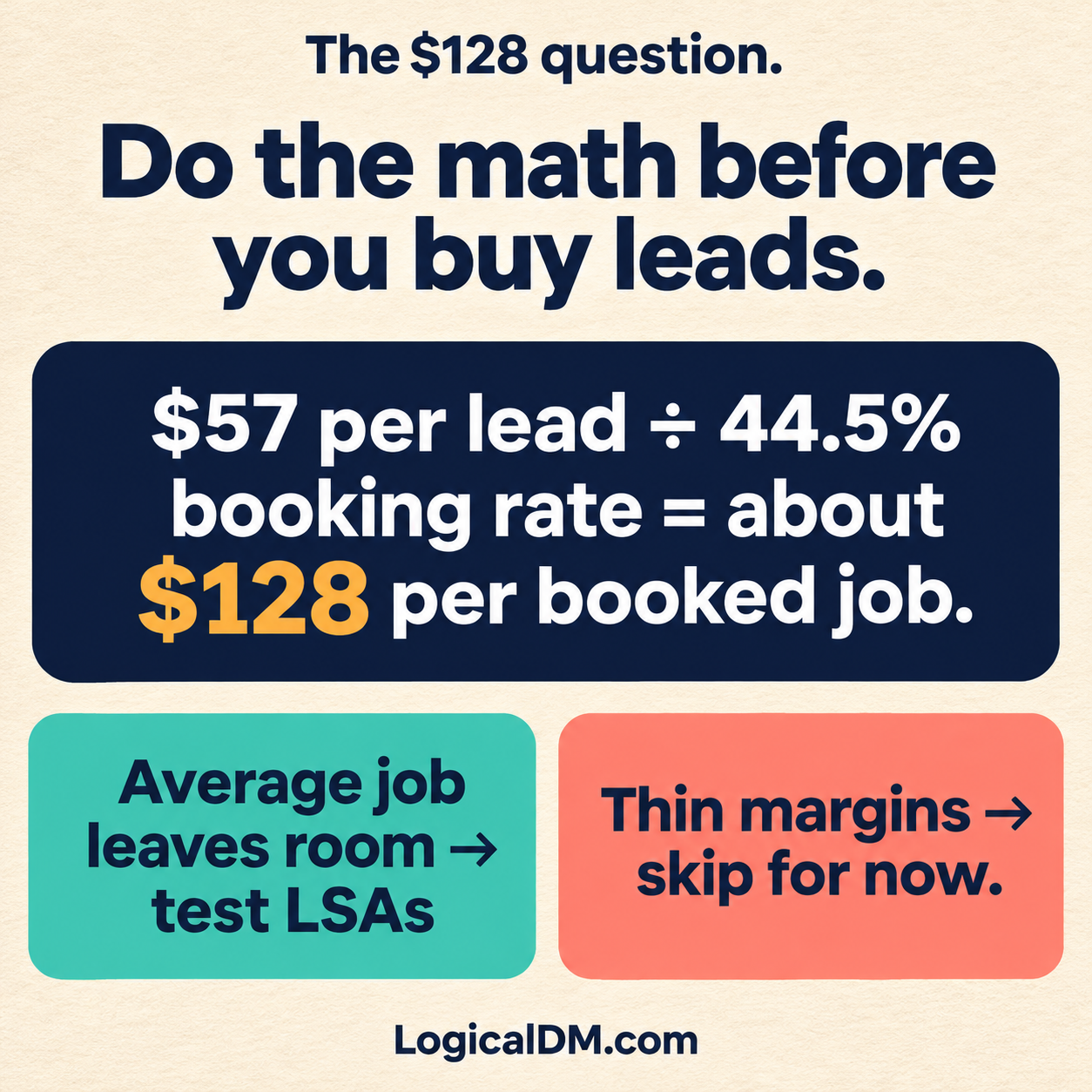
You pay per lead, not per click. A February 2026 SearchLight benchmark of 230 plumbing accounts put the average at about $57 per lead, with 44.5% of leads booking. Heads up: Google started moving Local Services campaigns into Google Ads as a pay-per-lead Performance Max type in August 2026, so the setup screens you see may look different from what your buddy described last year.
What to skip — and when this isn't worth it
I'd rather talk you out of spending money than watch you waste it. Here's my honest list.
Skip these outright:
A virtual office or mailbox address in the city you wish you were in. It's against Google's guidelines, and address problems are one of the most common reasons profiles get suspended. A suspended profile ranks nowhere.
Keywords in your business name that aren't on your paperwork and your trucks. Covered above. The short-term bump isn't worth betting the whole listing on.
A second profile for each town. One business, one location, one profile. Duplicates are a suspension risk, not a growth strategy.
Spending a weekend maxing out all 20 service areas to "rank in more towns." Set it honestly in ten minutes and move on.
Anyone who guarantees you a #1 spot on Google Maps. Google says there's no way to pay for a better local ranking. If someone's selling a guarantee, ask exactly what they plan to change on your profile. If the answer involves your name or your address, walk away.
When it isn't worth chasing:
A town that's far from your verified address and full of plumbers. You may never crack the map pack there, and that's okay. A strong page on your website, ads, or simply winning where you are will usually pay better than fighting physics. (The one honest exception: if the business case for a real, staffed second location already makes sense, that's a business decision first and a marketing decision second.)
Local Services Ads, if your numbers don't carry it. Do this math before you sign up. At roughly $57 a lead and a 44.5% booking rate (the SearchLight plumbing averages above), you're paying about $128 for every job that actually books — before your truck rolls. If your typical service call doesn't leave room for that, LSAs will feel like a leak you can't find. Your market's numbers may be higher or lower; track your own cost per booked job for a month before you decide.
Paid rank-tracking software for a one- or two-truck shop. A few screenshots from customers in different towns, once a month, may tell you all you need.
Where I'd be guessing (so I won't): I haven't run side-by-side tests of rank-tracking tools or local SEO agencies for this article, so I'm not going to rank them for you. Here's how to judge one yourself: ask to see before-and-after map grid reports for a real service-area client (not a storefront); ask what they'll change on your profile and what they'll leave alone; ask whether they'll ever touch your name, address or number of listings; and ask for a month-to-month option. A good one will answer all four without squirming.
The plumber's local visibility checklist
Profile health
I show up when someone searches my exact business name plus my town in Google Maps (private window).
My profile shows no verification or suspension warning.
There's only one profile for my business.
Profile completeness
My business name matches my registration and truck lettering — no extra keywords.
My hours are accurate, including real after-hours or emergency availability.
My services list includes the jobs I actually want calls for.
My phone number is local and answered by a person.
I have real photos of my trucks, team and work.
I've gotten at least one new review in the last month, and I reply to reviews.
Categories and location
My primary category is Plumber.
My secondary categories match work I actually do.
I know which address I verified with, and it's current.
My address is hidden if customers don't visit me, or shown only if I have a staffed location they can visit.
My service area lists real towns (20 max) within about a 2-hour drive.
Competition
I've compared my distance, category, name, reviews and hours with the top three plumbers where I want to win.
I've gotten screenshots of real searches from at least two towns I care about.
FAQ
Why isn't my plumbing business showing up on Google Maps?
Usually it's one of four things: your profile isn't verified or has been suspended, your primary category isn't set to Plumber, you're too far from the person searching, or you have too few recent reviews. Search your exact business name in Google Maps first. If you don't appear, it's a profile problem; if you do, it's a ranking problem.
Does adding more service areas help me rank in more towns?
Not in any way you can count on. Google lets you list up to 20 service areas, but testing by Sterling Sky found rankings stayed tied to the address the business verified with, even when that address was hidden. Set your service area honestly so customers know where you work.
Can I pay Google to rank higher on Google Maps?
No. Google says there's no way to request or pay for a better local ranking. You can pay for Local Services Ads, which appear above the map results, but that's advertising, not a ranking boost.
Should I put "plumber" and my city in my business name on Google?
Only if those words are really part of your registered business name. Google's guidelines say adding extra information to your business name isn't permitted and can get your profile suspended.
How many Google reviews does a plumber need?
Aim for at least 20, and keep new ones coming. BrightLocal's 2026 survey found 47% of consumers won't use a business with fewer than 20 reviews, and 74% want to see reviews from the last three months.
How long does it take for Google Business Profile changes to show up?
Google says edits can take up to three days to affect search results, service-area changes can take up to 48 hours to appear, and a new business can take up to a month to start ranking.
What's the most important Google Maps ranking factor for plumbers?
Your primary category. Whitespark's 2026 Local Search Ranking Factors survey ranked it first out of 187 factors, just ahead of how close your business is to the person searching.
Sources
Google Business Profile Help — Tips to improve your local ranking on Google
Google Business Profile Help — Guidelines for representing your business on Google
Google Business Profile Help — Service-area and hybrid businesses
Whitespark (Darren Shaw) — 2026 Local Search Ranking Factors
Whitespark — Should service area businesses show or hide their address?
Whitespark Local Insider — Case study: can a SAB move locations without losing rankings?
Sterling Sky (Joy Hawkins) — Does the service area in Google Business Profile impact ranking?
Sterling Sky — Hiding your address and Google Business ranking
Sterling Sky — Do services in Google Business Profile impact ranking?
Local Search Forum — Do service areas impact local rankings? (discussion)
BrightLocal — Local Consumer Review Survey 2026
BrightLocal — Local SEO statistics
PPC Land — Google bans countries and states from service areas
PPC Land — Local Services Ads
SearchLight Digital — Google Local Services Ads cost per lead benchmark (plumbing figures as reported by Enrich Labs)